Compact air purifier with clear airflow space in a calm bedroom
Bedroom & Comfort

Best Air Purifier for a Bedroom: Size, Noise and Filters

Disclosure: As an Amazon Associate, My Indoor Space may earn from qualifying purchases made through links in this guide, at no extra cost to you.

A bedroom air purifier needs to move enough air to matter while staying quiet enough to run through the night. That balance is more important than a long feature list. Room size, clean-air delivery, fan speed, filter availability, and placement determine real-world performance.

Purifiers can reduce certain airborne particles when correctly sized and maintained, but they do not replace ventilation, moisture control, cleaning, or removal of pollution sources. Choose a model for a specific room and concern rather than expecting one device to solve every air-quality problem.

Quick verdict

Use a published smoke CADR or equivalent tested performance to size the purifier, then confirm that the lower sleep speed still moves useful air. Prefer mechanical particle filtration, transparent replacement-filter costs, dimmable controls, and a design that does not intentionally produce ozone.

Who this is for—and when to skip it

Buy it for: Supplementary particle filtration in a bedroom, when the purifier’s clean-air delivery suits the room at a fan speed you can tolerate.

Skip the upgrade when: An existing purifier already meets those needs and replacement filters remain available. Do not buy a purifier as a substitute for repairing leaks, removing mold-damaged materials, or addressing a pollution source.

Best value: Useful airflow and affordable replacement filters matter more than an app. Paying for a larger unit is worthwhile when it delivers the required airflow more quietly; extra connectivity alone does not establish better cleaning.

This is a research-based buying guide, not a hands-on product ranking. See the EPA’s air-cleaner guidance for filtration’s role alongside source control and ventilation.

What to compare first

Feature Why it matters Practical target
Clean-air delivery Shows particle-removal rate Verified CADR suited to room size
Sleep noise Determines overnight comfort Published dB at relevant speed
Filter cost Shapes long-term use Available replacement with clear interval
Airflow clearance Affects performance Unblocked intake and outlet

Size by clean-air delivery, not only floor area

Room-size claims may use different ceiling heights and air-change assumptions. A smoke CADR or similar independent performance measure makes comparison easier. Larger rooms and higher ceilings require more clean air per minute.

Do not size the unit solely by its highest turbo setting if you will never tolerate that noise at night. A larger purifier running at a moderate speed may be quieter than a small unit working at maximum.

Compare noise at the speed you will use

Manufacturers often advertise the lowest decibel figure, which may correspond to a very slow fan. Look for noise information across multiple settings and reviews that discuss tonal hum, rattling, or button sounds.

Sleep mode should dim or switch off lights while maintaining the chosen fan behavior. Automatic modes can be useful, but a sudden speed increase may disturb light sleepers.

Understand particle and odor filters

A genuine high-efficiency particle filter can capture airborne particles as air passes through the machine. Marketing terms such as HEPA-type are less specific, so review the stated standard and test information.

Activated carbon can reduce some odors and gases, but a thin carbon sheet has limited capacity. Strong or hazardous fumes require source control and ventilation, not reliance on a bedroom purifier.

Avoid unwanted ozone

Mechanical filtration does not require ozone generation. Some products add ionization, plasma, or other electronic features. If such a feature exists, confirm it can be disabled and check applicable emissions certification.

People with respiratory concerns should follow guidance from a qualified health professional. An air purifier is not a treatment and cannot guarantee prevention of illness.

Plan for filter cost and availability

Calculate annual cost using the price and realistic replacement interval of every filter. Dust, smoke, pets, and high fan use can shorten service life, while timer lights are only estimates.

Check whether replacements are consistently available and whether the warranty requires branded filters. A low purchase price can become expensive if filters are proprietary or difficult to source.

Place the purifier for clear airflow

Keep the intake and clean-air outlet away from walls, curtains, bedding, and furniture. Follow the clearance in the manual, and do not place the unit where someone can trip over its cord.

Near the breathing zone can be helpful, but avoid aiming a strong draft directly at the bed. Close placement cannot compensate for blocked airflow or an undersized machine.

Control sources and maintain the room

Vacuum with appropriate filtration, wash bedding, control indoor smoking and candles, repair moisture problems, and ventilate when outdoor conditions permit. These actions reduce the burden on the purifier.

Clean the prefilter as directed and replace main filters on time. Never wash a filter unless it is explicitly designed to be washable, because water can damage filter media.

Common buying mistakes

  • Buying from a generous room-size claim without checking CADR or assumptions.
  • Comparing only the lowest advertised noise number.
  • Ignoring annual replacement-filter price and availability.
  • Blocking the intake beside a wall, curtain, or bed.
  • Expecting a purifier to replace ventilation, cleaning, or moisture-source control.

Frequently asked questions

What size air purifier do I need for a bedroom?

Match verified clean-air delivery to room area, ceiling height, and desired air changes. Size for a fan speed you can tolerate while sleeping, not only maximum speed.

Is HEPA necessary?

A well-specified high-efficiency particle filter provides clearer performance expectations than vague HEPA-type wording. Verified whole-unit clean-air delivery still matters.

Should I run the purifier all night?

Continuous operation can maintain particle removal, provided the unit is safely placed and the noise is comfortable. Follow the manufacturer’s operating guidance.

Where should I place it?

Use an open location with the required clearance around intakes and outlets. Avoid corners, curtains, bedding, heat sources, and trip hazards.

Can an air purifier remove mold?

It may capture some airborne particles, but it cannot fix water intrusion or remove growth from materials. Moisture and contaminated materials must be addressed directly.

Final answer

The best bedroom air purifier is appropriately sized, quiet at a useful speed, affordable to maintain, and placed where air can move freely. Choose verified performance over vague claims, avoid intentional ozone generation, and combine filtration with source control, cleaning, and ventilation.

For setup help, read our air purifier placement guide, humidity monitor guide, and humidifier guide.


Smooth mattress protector fitted over a mattress corner
Bedroom & Comfort

Best Mattress Protector: Waterproof, Quiet and Breathable

Disclosure: As an Amazon Associate, My Indoor Space may earn from qualifying purchases made through links in this guide, at no extra cost to you.

A mattress protector should defend the bed from everyday spills, perspiration, and dust without making the sleep surface hot, noisy, or loose. The best design is not simply the thickest waterproof layer; it is the one that fits securely and survives regular washing.

Protectors range from fitted-sheet styles to full encasements. Materials, waterproof membranes, pocket depth, and care limits affect comfort and durability, so match the design to the reason you are protecting the mattress.

Quick verdict

Choose a fitted waterproof protector for routine spill defense and an encasement only when you need all-sided coverage. Look for a quiet flexible membrane, breathable top fabric, secure elastic, dimensions matched to the mattress depth, and care instructions you can follow consistently.

What to compare first

Feature Why it matters Practical target
Coverage Determines protected surfaces Fitted top or six-sided encasement
Membrane Controls liquid barrier and noise Thin, flexible waterproof layer
Fit Prevents bunching Pocket depth matched to mattress
Care Affects long-term protection Washable with clear heat limits

Choose the right coverage style

A fitted-sheet protector covers the top and sides and is easy to remove for washing. It suits common spills and perspiration. A five-sided model may add side protection without fully enclosing the underside.

A six-sided encasement zips around the entire mattress. It takes more effort to install but may be preferred for comprehensive containment. If allergen or pest claims matter, review the exact testing and zipper construction rather than relying on broad marketing language.

Understand waterproof membranes

Many waterproof protectors use a thin polyurethane-style barrier laminated beneath a fabric surface. A flexible, well-bonded membrane can block liquid with less crinkling than thick vinyl-like materials.

Waterproof does not mean indestructible. High heat, bleach, fabric softener, or a damaged seam can reduce performance. Follow the label and replace a protector that peels, cracks, or leaks.

Balance breathability and spill protection

The top fabric can move moisture and feel softer, while the waterproof membrane prevents liquid from reaching the mattress. Cotton blends, polyester knits, and rayon-derived fabrics each feel different, but construction matters more than a single fiber name.

A protector cannot cool a room or change the mattress core. If overheating is a concern, choose a thin model, use breathable sheets, and manage room temperature and bedding weight.

Measure mattress depth carefully

Measure from the bottom edge to the highest point, including any permanently attached pillow top. If you use a separate topper beneath the protector, include it in the total depth.

A pocket that is too shallow can pull off corners; one that is excessively deep may bunch. Strong continuous elastic or fitted side panels help maintain tension after repeated washing.

Reduce noise and texture changes

Thin knit surfaces and supple membranes tend to feel quieter than stiff layers. Reviews can reveal crinkling, but sound also depends on sheet tension, mattress firmness, and room quietness.

Wash the protector before first use if the care label recommends it. Proper fitting and a smooth sheet over the top can reduce shifting, although a protector with a rough or padded surface may still change mattress feel.

Follow care instructions exactly

Most protectors should be washed on a gentle or normal cycle with mild detergent, then dried at low heat or air-dried. The manufacturer’s label overrides general advice because membrane materials and laminates differ.

Own a second protector if overnight accidents or frequent washing are likely. Rotating two reduces the temptation to use high heat for a fast turnaround, which may shorten the waterproof layer’s life.

Inspect performance over time

Check seams, elastic, zipper areas, and the underside membrane when changing sheets. Delamination, cracking, persistent odor, or lost stretch are signs that protection may be compromised.

A protector supports mattress care but does not replace prompt spill cleanup. Remove wet bedding quickly and dry the mattress according to its manufacturer’s instructions before remaking the bed.

Common buying mistakes

  • Buying by bed size without measuring mattress and topper depth.
  • Assuming every waterproof protector is equally quiet or breathable.
  • Using high dryer heat, bleach, or fabric softener against the care label.
  • Choosing an encasement when frequent removal will make washing impractical.
  • Keeping a protector after the membrane begins peeling or cracking.

Frequently asked questions

Is a waterproof mattress protector noisy?

Some are, but thin flexible membranes and knit top fabrics tend to be quieter. Correct sizing and washing before use may also reduce stiffness.

Does a protector make a bed sleep hotter?

It can change airflow and feel, especially if thick or poorly fitted. A thin breathable top and lighter bedding may reduce the effect, but no waterproof barrier is completely air-open.

Should I put a protector over a mattress topper?

Usually, if you want to protect both layers and the combined depth fits the protector. Check the topper and mattress care guidance.

How often should I wash it?

Follow the label and wash after spills or soiling. For routine care, coordinate with bedding changes while avoiding unnecessary harsh heat or chemicals.

What is the difference between a protector and a mattress pad?

A protector focuses on defense from liquid or contaminants. A pad primarily changes cushioning, though some products combine both functions.

Who should buy it—and who should skip it

Buy it if: you want an extra barrier against spills, sweat, dust, or allergens without changing the feel of the mattress too much.

Skip it if: your current protector is quiet, breathable, waterproof where needed, and still in good condition.

Best value

A fitted protector with a quiet waterproof membrane and breathable top fabric is the best value for most beds.

When the upgrade is worth it

Pay more for better temperature control, deeper pocket fit, stronger seams, and easier laundering when those solve a real problem. Premium branding alone does not improve protection.

Final answer

The best mattress protector disappears under the sheet while providing dependable coverage. Match the style and pocket depth to the bed, favor a supple waterproof layer and secure elastic, and follow the washing limits. Good fit and careful drying are the keys to quiet, durable protection.

For a more comfortable bedroom, see our guides to blackout curtains and heated blanket features and safety.

Digital humidity monitors in a living room and bedroom
Smart Home

Best Humidity Monitor for Home: What to Look For

Disclosure: As an Amazon Associate, My Indoor Space may earn from qualifying purchases made through links in this guide, at no extra cost to you.

A humidity monitor, often called a hygrometer, helps you see whether indoor air is trending dry, comfortable, or damp. It can guide decisions about ventilation, humidifiers, and dehumidifiers, but the reading is only useful when the sensor is reasonably accurate and placed correctly.

Simple display models are inexpensive and easy to move. Connected models add history, alerts, and remote viewing. Choose based on whether you need a quick room check or long-term trends rather than assuming the most connected device is the most accurate.

Quick verdict

For most homes, choose a monitor that states humidity accuracy, displays temperature and relative humidity clearly, and refreshes often enough to show meaningful changes. Add Bluetooth or Wi-Fi logging when you need alerts or want to compare rooms and seasons.

What to compare first

Feature Why it matters Practical target
Humidity accuracy Determines confidence in readings Published tolerance around ±2–5% RH
Display Makes daily checks easy Large numbers and min/max
Logging Shows trends over time App history or onboard memory
Placement Prevents distorted readings Away from vents, windows, and moisture sources

Understand accuracy and resolution

A display that changes in one-percent steps is not necessarily accurate to one percent. Look for a stated tolerance, such as a number of percentage points of relative humidity within a defined temperature range.

Consumer monitors can disagree. If several sensors are used, place them together for a day and note consistent offsets before assigning them to rooms. For critical applications, use calibrated equipment designed for that purpose.

Choose a display you will actually read

Large humidity and temperature numbers are more useful than a crowded screen. Minimum and maximum records can reveal overnight or daytime swings without requiring an app.

Comfort icons are convenient but simplify a complex topic. Treat them as prompts, not medical or building diagnostics. Your climate, season, building materials, and household activities all affect an appropriate range.

Decide between standalone, Bluetooth, and Wi-Fi

A standalone monitor is private, inexpensive, and reliable for quick checks. Bluetooth adds phone-based history within local range. Wi-Fi can provide remote alerts, multi-room dashboards, and longer cloud records.

Connected features introduce accounts, permissions, batteries, and possible subscription or support changes. Check how data is exported and what remains available without internet access.

Place the monitor correctly

Put the sensor where room air circulates naturally, usually several feet from the floor. Keep it away from supply vents, radiators, direct sun, open windows, exterior walls, humidifier mist, bathrooms, and cooking steam unless those are the specific conditions being measured.

After moving a monitor, allow time for the reading to settle. A reading beside a humidifier or dehumidifier represents the appliance’s immediate airflow, not the whole room.

Use trends instead of chasing every change

Relative humidity changes as temperature changes, so short-term movement is normal. Look for patterns lasting hours or days, such as a bedroom that becomes damp overnight or a basement that rises after rain.

Use the monitor to evaluate an intervention over time. If running a dehumidifier changes only the area near the machine, improve placement, airflow, or capacity rather than reacting to a single instant reading.

Consider power and alert behavior

Button-cell or AAA-powered displays can run for months, but connected sensors may need more frequent batteries. Check whether low-battery warnings are obvious and whether history is preserved during replacement.

For alerts, look for adjustable thresholds and notification delays. Repeated alerts for brief harmless spikes can become noise, while a sustained-high setting may be more useful.

Know what a monitor cannot tell you

A humidity monitor does not identify mold, prove that a room is safe, diagnose illness, or locate a hidden leak. Persistent condensation, musty odors, water damage, or symptoms require investigation beyond a consumer display.

If humidity stays high despite ventilation or dehumidification, address moisture sources and seek qualified building or health advice where appropriate.

Common buying mistakes

  • Assuming display resolution is the same as sensor accuracy.
  • Placing the monitor beside a vent, sunny window, humidifier, or dehumidifier.
  • Reacting to single short-term readings instead of sustained trends.
  • Buying a connected model without checking app, privacy, or export support.
  • Using a humidity reading as proof that mold or health risks are absent.

Frequently asked questions

What indoor humidity level should I aim for?

Many homes are commonly kept in a moderate range, but the right target depends on climate, season, building conditions, and condensation risk. Use local professional guidance when moisture problems persist.

Why do two hygrometers show different readings?

Consumer sensors have accuracy tolerances and may respond at different speeds. Place them side by side for a full day to compare consistent offsets.

Where should I put a bedroom humidity monitor?

Place it in open room air away from windows, exterior walls, vents, direct sun, and a humidifier’s mist. A bedside table can work if it meets those conditions.

Do I need Wi-Fi?

No. Wi-Fi is helpful for remote alerts and long-term records. A clear standalone display is sufficient for routine spot checks.

How often should a humidity monitor update?

Frequent updates help show room changes, but accuracy and stable placement matter more than second-by-second movement. Check the stated refresh interval and allow settling time after relocation.

Who should buy it—and who should skip it

Buy one if: you are troubleshooting dry air, condensation, a dehumidifier, humidifier, plants, or storage conditions and want an objective humidity reading.

Skip it if: you do not need ongoing humidity information and already have a reliable sensor built into another device.

Best value

A simple digital hygrometer with a clear display, min/max memory, and reasonable accuracy is the best value for most rooms.

When the upgrade is worth it

Pay more for calibrated accuracy, remote sensors, or app history when you need to compare rooms or track trends. Extra smart features are unnecessary for a single quick reading.

Final answer

The best home humidity monitor provides believable readings in a format you will use. Prioritize stated accuracy, readable numbers, appropriate placement, and trend data that matches your needs. Treat the sensor as an early-warning and decision tool, then investigate persistent moisture or dryness at the source.

Next, use the readings with our dehumidifier sizing guide and humidifier buying guide.

Smart power strip organizing devices and cables in a home office
Smart Home

Best Smart Power Strip for a Home Office

Disclosure: As an Amazon Associate, My Indoor Space may earn from qualifying purchases made through links in this guide, at no extra cost to you.

A smart power strip can schedule lamps, cut standby power, and control selected office devices without crawling under a desk. The useful part is not the word smart; it is having independently controlled outlets, reliable local buttons, and electrical protection appropriate for the equipment connected.

Power strips are not universal solutions. High-draw appliances, space heaters, and equipment that a manufacturer says must connect directly to a wall outlet do not belong on an ordinary smart strip. Start with the electrical limits, then compare app features.

Quick verdict

Choose a certified strip whose amperage, voltage, and total wattage match your circuit and connected equipment. Look for individually controlled outlets, always-on sockets for devices that should not be switched off, a physical power button, clear surge information, and an app that supports the automations you will actually use.

What to compare first

Feature Why it matters Practical target
Electrical rating Sets the safe total load Match voltage, amps, and watts
Outlet control Determines useful automation Individual control plus manual buttons
Surge protection Helps manage transient spikes Published joule rating and status light
Connectivity Affects reliability Compatible Wi-Fi and current app support

Start with electrical safety

Read the strip’s maximum current and wattage, then total the loads of every connected device. A power strip increases outlet count; it does not increase the capacity of the branch circuit. Stop using any strip that becomes hot, discolored, cracked, or loose.

Choose a product certified by a recognized testing organization for your market and follow its placement instructions. Do not daisy-chain power strips, run them under rugs, or use indoor models in damp locations.

Decide which outlets need smart control

Individually controlled AC outlets provide the most flexibility. You might schedule a desk lamp while leaving a computer, router, or network storage device on an always-on outlet. Group control is simpler but may shut down equipment unintentionally.

USB ports are convenient for charging, yet they may not be switchable separately. Check output standards and power-sharing behavior if you plan to charge a laptop, tablet, or several devices at once.

Check Wi-Fi and platform compatibility

Many smart strips use 2.4 GHz Wi-Fi rather than 5 GHz. Confirm compatibility with your router, phone operating system, and preferred voice or automation platform before purchase.

Cloud-dependent features may stop working during an internet outage or after the manufacturer ends support. Physical buttons provide an important fallback. If local control matters, look for products that explicitly support it rather than assuming.

Use schedules and energy features thoughtfully

Schedules can turn task lighting or accessories off after work hours. Countdown timers are useful for devices that should run briefly. Energy monitoring can help identify standby consumption, although measurements may be estimates rather than laboratory-grade readings.

Avoid automating a computer, external drive, printer during an active job, or any device that requires a controlled shutdown. A smart strip should support safe routines, not abruptly remove power from sensitive electronics.

Understand surge protection claims

A surge-protected model should publish a joule rating and show whether protection is still active. The rating helps compare capacity, but no plug-in strip can protect against every event, especially a direct lightning strike.

Surge components wear over time. Replace the strip after a major surge or when the protection indicator goes out, following the manufacturer’s guidance. Important data still needs backups.

Plan the physical layout

Check plug spacing for bulky adapters, cord length, plug orientation, and mounting slots. A flat wall plug may help behind furniture, while widely spaced outlets keep adapters from blocking neighbors.

Mount the strip where air can circulate and where its status lights and buttons remain visible. Keep cords supported so their weight does not pull plugs partly out of the sockets.

Review privacy and account requirements

Smart strips may require an account, location permission for setup, or integration with a voice assistant. Review the app’s permissions, update history, and account security options before connecting it to your home network.

Use a unique password, enable multi-factor authentication when available, and install firmware updates. Retire a device if the app is abandoned or known security support ends.

Common buying mistakes

  • Choosing by outlet count without checking the total electrical rating.
  • Connecting heaters or other high-draw appliances against manufacturer guidance.
  • Daisy-chaining the strip or covering it with rugs or furniture.
  • Scheduling equipment that needs a proper software shutdown.
  • Assuming surge protection remains effective forever.

Frequently asked questions

Can I plug a computer into a smart power strip?

Usually, if the electrical ratings permit it, but avoid automations that cut power before the computer shuts down normally. An uninterruptible power supply may be more appropriate for outage protection.

Does a smart power strip work without Wi-Fi?

Physical buttons should still operate on many models, but schedules and app controls vary. Check whether automations are stored locally or depend on the cloud.

Can I connect a space heater?

Do not connect one unless both the heater and strip manufacturers explicitly allow it. Many space heaters should plug directly into a wall outlet because of their sustained high load.

What does a joule rating mean?

It is one measure of how much surge energy the protection components can absorb over time. Compare it alongside certification, status indicators, and warranty terms.

Are USB ports on a smart strip individually controlled?

Sometimes, but often all USB ports act as one group or remain always on. Read the outlet-control diagram in the specifications.

Who should buy it—and who should skip it

Buy it if: your desk has several low-power devices and you want one controllable strip for schedules, voice control, or shutting down standby loads.

Skip it if: a standard surge protector already meets your needs or the equipment should not be switched remotely.

Best value

A certified strip with individually controlled outlets, usable USB charging, and a physical power button is the best value for most home offices.

When the upgrade is worth it

Pay more for better energy monitoring, stronger platform support, and reliable local controls when you will use them. More outlets are not an upgrade if the strip becomes crowded or unsafe.

Final answer

The best home-office smart power strip is first a correctly rated, certified electrical device and second an automation accessory. Select the right outlet layout, keep essential equipment off unsafe schedules, and retain manual control. Good cable placement and sensible automations will matter more than a long list of app features.

Compare this with our smart plugs for beginners guide and charging station buying guide.

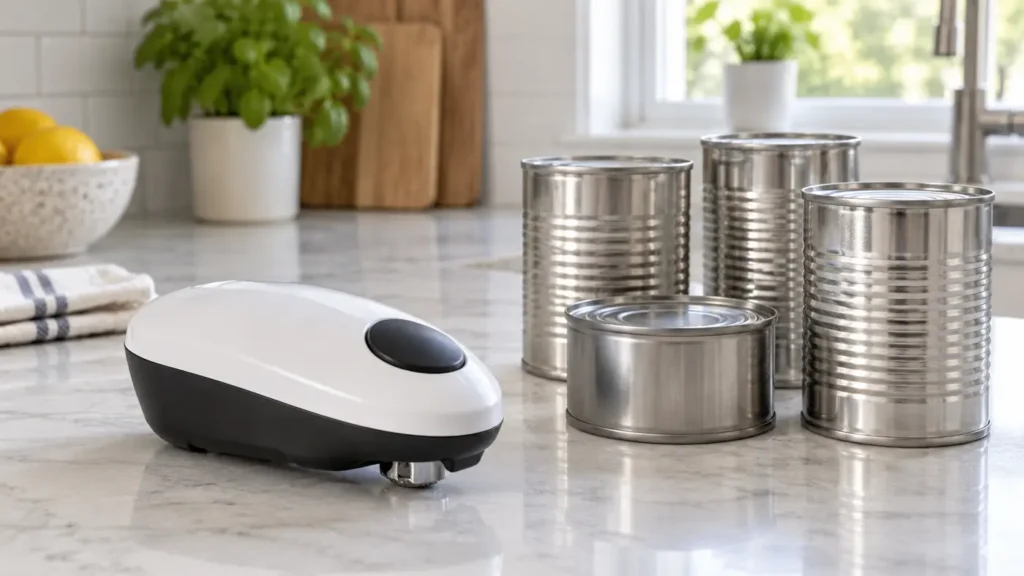
Compact one-touch electric can opener beside plain metal cans
Kitchen & Dining

Best Electric Can Opener for Easy One-Touch Use

Disclosure: As an Amazon Associate, My Indoor Space may earn from qualifying purchases made through links in this guide, at no extra cost to you.

An electric can opener can remove the repetitive twisting and gripping required by a manual model. The best option is easy to position, starts and stops predictably, handles the can sizes you use, and does not turn cleanup into a new problem.

One-touch designs include countertop openers that rotate the can vertically and compact battery models that travel around the lid. Each style has tradeoffs in stability, storage, power, and the type of cut it makes.

Quick verdict

Choose a stable countertop model for frequent use and varied can sizes, or a compact battery opener when storage and portability matter most. Look for clear controls, a dependable magnet or lid lift, easy access for cleaning, and a manual release for jams.

What to compare first

Feature Why it matters Practical target
Opener type Changes stability and storage Countertop or compact travel-around
Cut style Affects edge and lid reuse Top cut or side cut
Release Helps with jams Accessible manual release
Cleaning Prevents residue buildup Removable washable cutter

Choose countertop or compact operation

Countertop models usually hold the can against a cutting assembly while a motor turns it. They are convenient for frequent use and often handle a wider range of standard cans, but they require dedicated counter or cabinet space.

Compact openers sit on the lid and move around it. They store easily and may be useful for someone who cannot comfortably align a heavy can with a tall machine. Check the allowed can shapes and diameters because irregular or very large cans may not work.

Understand top-cut and side-cut designs

Traditional openers cut through the lid near the inner rim, which can leave a sharp edge and bring the cutting wheel close to food. Side-cut or smooth-edge models separate the lid at the seam, often creating a less sharp edge.

No cut is guaranteed harmless. Handle lids carefully, keep fingers away from the cutting mechanism, and discard damaged or swollen cans without opening or tasting the contents.

Look for simple, predictable controls

A true one-touch design should begin with a large, obvious control and stop automatically or with an equally clear second action. Tiny switches or multi-step alignment can undermine the convenience.

Check how a jam is released before purchase. A manual release lever, reverse function, or accessible battery compartment can help, but always unplug the unit or follow the manufacturer’s safety directions before touching the cutter.

Match the opener to your usual cans

Review maximum can height, diameter, weight, and shape. Tall countertop openers need enough clearance, while small travel-around units may struggle with heavy, dented, rimless, or non-round containers.

If you open only a few standard cans a month, a compact unit may be sufficient. For frequent cooking, prioritize motor consistency, a broad stable base, and a cord arrangement that will not pull the machine toward the counter edge.

Check power and battery requirements

Corded openers provide consistent power but need a nearby outlet. Battery-operated models reduce cord clutter, yet weak batteries can cause slow cutting or stalls. Rechargeable versions avoid disposable batteries but must be kept charged.

Confirm battery type, expected runtime, charging connector, and whether the device can be opened manually if power fails. Never mix old and new disposable batteries.

Make cleaning easy

Food residue can collect around the cutter and magnet. A removable cutting assembly is easier to clean than a fixed mechanism, provided it locks back into place securely after drying.

Do not immerse a motorized opener unless the manufacturer explicitly allows it. Wipe the body with a damp cloth, wash removable parts as directed, and let every component dry fully before reassembly.

Prioritize stability and safe placement

A wide non-slip base helps a countertop opener resist tipping. Set it on a dry, level surface with the cord away from burners, sinks, and walkways. Support unusually heavy cans rather than letting them hang from the mechanism.

Store compact units so the start button cannot be pressed accidentally. Keep the opener and removed lids away from children, and inspect the cutter for damage before use.

Common buying mistakes

  • Assuming every opener works with oversized, rimless, or non-round cans.
  • Choosing a model with no clear jam-release method.
  • Ignoring the cleaning instructions for the blade and magnet.
  • Letting a heavy can hang unsupported from a small countertop unit.
  • Handling a cut lid as if it cannot be sharp.

Frequently asked questions

Do electric can openers leave sharp edges?

It depends on the cutting design. Side-cut models often produce a smoother edge, while top-cut designs can leave a sharper rim. Handle every lid carefully.

Are one-touch openers suitable for limited grip strength?

They may reduce twisting and squeezing, but alignment, lifting, and cleaning still matter. Check control size and weight, and consider professional guidance for specific mobility needs.

Can an electric opener handle large cans?

Only if the manufacturer lists the can’s size and weight as supported. Tall or heavy cans may need a full-height countertop model and hand support during use.

How should I clean the cutter?

Unplug the opener or remove batteries, detach the cutter if designed to be removable, and follow the manual. Do not immerse the motor housing.

What should I do if the opener jams?

Stop the motor and use the model’s specified release or reverse procedure. Do not pull the can toward the exposed blade or insert fingers into the mechanism.

Who should buy it—and who should skip it

Buy it if: grip strength, wrist comfort, or frequent can opening makes a manual opener frustrating.

Skip it if: you rarely open cans or already have a manual opener that is easy and comfortable to use.

Best value

A stable one-touch countertop opener with simple controls and easy blade cleanup is the best value for most kitchens.

When the upgrade is worth it

Pay more for better stability, easier release, cleaner edge handling, and dependable operation with common can sizes. Extra styling is not a meaningful upgrade.

Final answer

The best one-touch electric can opener combines low-effort operation with stable positioning, a clear release method, and easy cleaning. Pick the format that matches your storage and can sizes, then treat the cutter and removed lid with the same care you would use with any sharp kitchen tool.

For related low-effort choices, read our ergonomic kitchen tools guide and food storage container comparison.

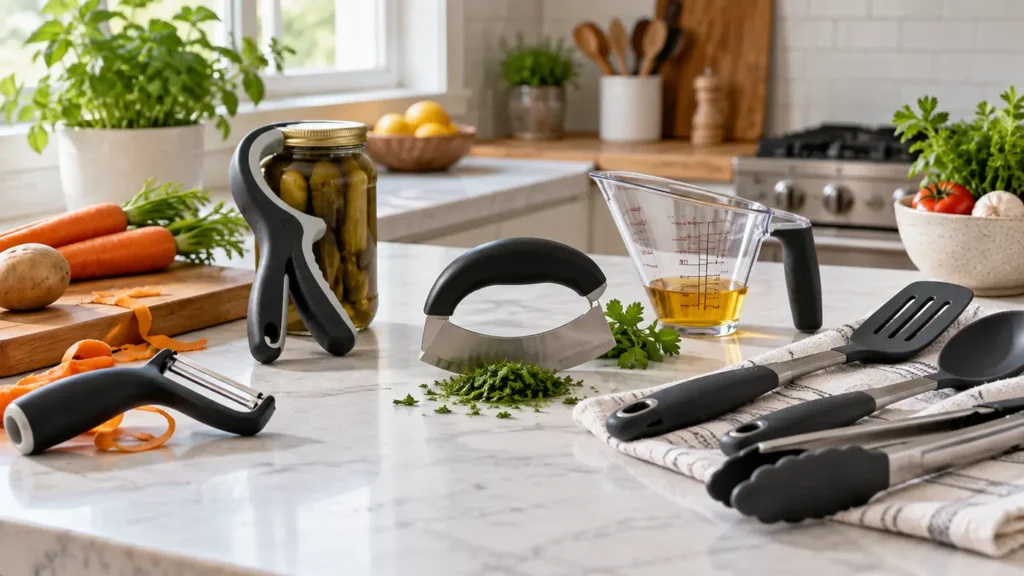
Ergonomic kitchen tools with wide handles arranged on a counter
Kitchen & Dining

Best Ergonomic Kitchen Tools for Easier Meal Prep

Disclosure: As an Amazon Associate, My Indoor Space may earn from qualifying purchases made through links in this guide, at no extra cost to you.

Comfortable kitchen tools can make chopping, peeling, opening, stirring, and serving feel less demanding. The most useful designs reduce unnecessary grip force, keep the wrist closer to a neutral position, and provide enough control without adding bulk.

Ergonomic is not a single certification or guarantee. Handle shape, weight, balance, leverage, and the task itself all matter. A tool that feels excellent in one hand may be awkward in another, so focus on fit and function instead of a label.

Quick verdict

Prioritize wide non-slip handles, low operating force, balanced weight, and controls that can be used without pinching. Start with the task that causes the most fatigue—such as peeling, opening cans, or cutting—then replace only the tools that will meaningfully improve it.

What to compare first

Feature Why it matters Practical target
Handle Controls grip pressure Wide, rounded, non-slip
Weight Affects fatigue and control Light but well balanced
Mechanism Determines operating force Leverage or powered assist
Cleaning Shapes daily usability Few seams, removable parts

What ergonomic design really means

A helpful tool should suit the motion required for the job. A broad handle spreads pressure across more of the hand, while a textured surface can reduce the need to squeeze. Angled handles may keep the wrist straighter during repetitive work.

Do not assume a thick handle is automatically comfortable. If it is too large, sharply contoured, or slippery, it can reduce control. Whenever possible, check dimensions and return policies before buying.

Choose knives and cutting tools for control

A sharp knife requires less force than a dull one. Look for a handle that feels secure, a manageable blade length, and balance that does not pull the wrist forward. A stable cutting board with a non-slip base is just as important.

Rocker knives, food choppers, or spring-assisted scissors can be alternatives for particular tasks. Keep guards and locks functional, follow the manufacturer’s care instructions, and store sharp edges safely.

Look for leverage in peelers and openers

A swivel peeler with a padded handle can follow the food while reducing wrist adjustment. Jar openers, bottle openers, and can openers should multiply force instead of depending on a tight pinch grip.

Powered tools may help with repetitive jobs, but they add batteries, motors, and cleaning steps. Check whether the controls are easy to reach and whether the device stops safely if it meets resistance.

Select mixing and serving tools by handle shape

Spatulas, spoons, ladles, and whisks with rounded handles are often easier to hold than thin flat metal shafts. A heat-resistant grip and a tool length matched to the pan can prevent awkward reaching.

For heavy mixtures, use a bowl with a non-slip base and a tool that does not flex excessively. Lightweight tools are useful, but an unbalanced head can still strain the wrist.

Consider appliance controls and setup

Large buttons, clear markings, one-touch operation, and easy-to-remove attachments can matter as much as motor power. Keep frequently used appliances within comfortable reach so they do not need to be lifted from a low cabinet each time.

An immersion blender can reduce transfers between a pot and countertop blender, while a lightweight electric can opener may reduce repetitive turning. Choose only appliances you can clean, store, and operate confidently.

Test grip, reach, and dominant-hand assumptions

Some tools are shaped for right-handed use, while others are symmetrical. Left-handed cooks should check blade orientation, locking mechanisms, and scale markings. People with smaller hands may prefer a narrower grip than generic ergonomic designs offer.

If pain, numbness, weakness, or loss of coordination is persistent, consult a qualified clinician or occupational therapist. Kitchen tools can improve convenience, but they do not diagnose or treat an underlying condition.

Make the work surface part of the solution

Tool choice cannot compensate for a counter that is too high, a sliding board, or ingredients placed out of reach. Bring the task close to the body, use a stable mat or damp towel under the board, and sit for prep when that is safer and more comfortable.

Break long prep jobs into shorter steps and alternate motions when possible. A simple mise en place—ingredients opened and arranged before cooking—also reduces rushed gripping and reaching.

Common buying mistakes

  • Buying a complete set without testing the most important handle sizes.
  • Choosing a heavy powered tool that is tiring to lift or difficult to clean.
  • Using dull blades, which require more force and are harder to control.
  • Assuming every ergonomic product works equally well for left- and right-handed users.
  • Treating a tool purchase as a substitute for professional advice about persistent pain or weakness.

Frequently asked questions

What makes a kitchen tool ergonomic?

It should reduce unnecessary force or awkward motion while remaining easy to control. Handle shape, texture, weight, balance, and leverage all contribute.

Are thicker handles always better?

No. A handle should match the user’s hand and the task. Too much thickness can make a tool difficult to control, especially for smaller hands.

Are electric kitchen tools easier to use?

They can reduce repetitive force, but only if the controls, weight, cleaning, and storage are manageable. Compare the full routine, not just the powered step.

Which tool should I replace first?

Replace the item used most often for a task that feels difficult or tiring. Common starting points are peelers, can openers, knives, jar openers, and mixing utensils.

Can ergonomic tools help with arthritis?

Some designs may make tasks more comfortable by reducing grip force, but needs vary. A clinician or occupational therapist can recommend adaptations for an individual condition.

Who should buy them—and who should skip

Buy ergonomic tools if: gripping, twisting, peeling, chopping, or opening containers causes fatigue and a better handle or leverage would make meal prep easier.

Skip replacing tools that already feel comfortable and give you good control.

Best value

Upgrade the one or two tools that cause the most strain first. A comfortable peeler, opener, or knife can deliver more value than buying a large matching set.

When the upgrade is worth it

Pay more for better handle shape, useful leverage, balanced weight, and replaceable parts when the tool is used often. Gimmicky multi-tools are rarely worth extra.

Final answer

The best ergonomic kitchen tools fit the user, reduce force, and remain simple to control and clean. Buy for a specific task, pay attention to handle dimensions and weight, and improve the workstation at the same time. Thoughtful choices can make everyday prep smoother without filling the kitchen with unnecessary gadgets.

You may also find our guides to the best immersion blender features and electric kettle buying considerations useful.

Organized small kitchen pantry with bins, turntable and shelf riser
Home Organization

Best Pantry Organizers for a Small Kitchen

Disclosure: As an Amazon Associate, My Indoor Space may earn from qualifying purchases made through links in this guide, at no extra cost to you.

A small pantry becomes frustrating when every shelf is packed but useful food still disappears behind taller packages. The best organizers do not simply add containers; they make everyday items visible, reachable, and easy to return to the right place.

Before buying a matching set, measure the actual shelf opening, depth, and vertical clearance. Then organize around what you store most often. A few correctly sized pieces usually outperform a large bundle of bins that leaves awkward gaps.

Quick verdict

Start with clear open-front bins for categories, a turntable for bottles, and one adjustable shelf riser for cans or jars. Add airtight containers only for foods that benefit from a seal. Choose pieces that fit the shelf and your habits, not a staged pantry photo.

What to compare first

Feature Why it matters Practical target
Open-front bins Keep packets and snacks grouped Handles plus straight sides
Turntable Makes bottles in a corner reachable Raised rim and non-slip base
Shelf riser Uses vertical space above short items Stable, adjustable width
Airtight container Protects selected dry foods Simple seal and wide opening

Measure before you shop

Measure shelf width, depth, height, and the narrowest point at the door frame. Note hinges, shelf supports, and any lip that reduces usable space. Leave enough clearance to lift a bin or open a lid without scraping the shelf above.

Sketch each shelf and assign a purpose before choosing products. Repeating a few modular widths makes the layout easier to change later, while unusually shaped organizers can create wasted strips of space.

Choose visibility over perfect matching

Clear bins help you see remaining stock, but perfectly transparent containers are not essential for every category. Open bins with simple labels can work better for packets, baking supplies, lunch items, and snacks because nothing needs to be decanted.

Avoid deep bins for tiny items unless they include dividers. If products stack in multiple layers, the organizer has recreated the same hidden-item problem it was meant to solve.

Use turntables in difficult corners

A turntable is useful for oils, vinegars, condiments, and jars that would otherwise be pushed to the back. A raised edge helps prevent narrow bottles from tipping when the tray rotates.

Check diameter carefully. A turntable that is too large may hit the wall or shelf frame; one that is too small wastes the corner. Divided models can help, but fixed sections may limit what fits.

Add vertical storage carefully

Shelf risers create a second level for cans, mugs, jars, or short food boxes. Adjustable models are helpful when shelf widths differ, but the expanded center should remain rigid under the expected load.

Tiered steps improve label visibility, although they consume more depth than a flat riser. Keep heavier containers on the lowest level and do not stack glass where it can be knocked forward.

Decide what really needs an airtight seal

Flour, sugar, rice, cereal, and some snacks may benefit from airtight storage when humidity, pests, or stale food are concerns. The lid should seal consistently, come apart for cleaning, and be easy to operate with dry or slightly damp hands.

Decanting everything creates work and can hide cooking instructions or best-before dates. Keep labels or write the product name and date on the container. Do not mix new food into an old batch before washing and drying the container.

Plan for cleaning and maintenance

Smooth corners and removable parts make organizers easier to clean. Confirm whether a product is dishwasher-safe; many large bins and lids should be hand-washed to avoid warping.

Wipe spills promptly and let containers dry completely before refilling them. Once a month, bring older items forward and remove empty packages so the system continues to save space.

Build zones that match your routine

Place breakfast, baking, snacks, or dinner staples together based on how your household cooks. Store daily items between waist and eye level, with bulk refills and rarely used supplies higher or lower.

A small back-stock limit prevents overbuying. If a category no longer fits its bin, use what you have before adding more storage. The organizer should set a useful boundary rather than justify extra clutter.

Common buying mistakes

  • Buying a large set before measuring every shelf.
  • Using tall sealed containers for foods that are already convenient in their packaging.
  • Choosing bins with heavily tapered sides that waste shelf width.
  • Packing organizers so tightly that none can be removed easily.
  • Ignoring dates and care instructions after decanting food.

Frequently asked questions

Are clear pantry bins worth it?

They are useful when visibility prevents duplicate purchases and forgotten food. Open-front or handled bins are often more practical than lidded boxes for items used every day.

Should pantry containers be airtight?

Use airtight containers for foods that benefit from moisture and pest protection. Packets, cans, and frequently used snacks may only need an open category bin.

What is the best organizer for a deep pantry shelf?

Use a pull-out bin, turntable, or clearly defined front-and-back zones. Avoid placing small loose items in the rear where they cannot be seen.

How much space should I leave around bins?

Leave enough room to grip and lift each bin without rubbing neighboring pieces. A small amount of clearance also makes cleaning easier.

Can I organize a pantry without decanting food?

Yes. Group original packages in bins, use shelf risers for cans, and add labels to zones. Decant only where it provides a real freshness or visibility benefit.

Who should buy them—and who should skip

Buy organizers if: pantry items are hard to see, deep shelves waste space, or food repeatedly expires because it gets buried.

Skip them if: the pantry already works well and adding bins would reduce usable space or hide labels.

Best value

Start with a few clear bins or turntables sized to the shelves and the foods you buy most. A small targeted setup is better value than filling every shelf with containers.

When the upgrade is worth it

Pay more for sturdy stackable bins, smooth turntables, or pull-out systems when they solve deep-shelf access. Decorative matching sets are not worth extra if they reduce flexibility.

Final answer

The best small-kitchen pantry system begins with accurate measurements and a few flexible tools. Prioritize access, visibility, stable construction, and easy cleaning. A simple arrangement of bins, a turntable, and a shelf riser is usually easier to maintain than a complicated wall of matching containers.

For more practical kitchen storage ideas, see our food storage container guide and kitchen habits for clear counters.

Indoor hydroponic herb garden with basil, parsley and mint on a kitchen counter
Kitchen & Dining

Best Indoor Herb Garden Kit: What to Know Before You Buy

Disclosure: This post contains affiliate links. If you buy through one of our links, we may earn a commission at no extra cost to you. Keep water away from electrical connections and use only approved nutrients and replacement parts. Some herbs are unsafe for pets.

An indoor herb garden kit can grow basil, parsley, mint and leafy greens under a built-in light even when a kitchen window is dim. The appliance simplifies lighting and watering, but it still needs pruning, cleaning and regular supplies.

The biggest long-term differences are growing height, pod compatibility, pump access and the price of replacement sponges, baskets and nutrients.

Quick verdict

Choose a six- to nine-pod garden with an adjustable light, visible water level, quiet replaceable pump and support for generic grow media or refillable baskets. Smaller gardens are easier to place; taller lights matter more than extra pod holes when herbs mature.

Indoor garden types

Choice Best for Advantage Watch for
Compact pod garden Herbs in a small kitchen Easy setup and small footprint Limited height and root space
Medium hydroponic garden Several herbs and greens Good balance of capacity and light Needs regular pruning
Large floor garden Leafy greens and larger harvests More growing area High cost and large footprint
Soil planter with grow light People avoiding proprietary pods Flexible seeds and natural medium More watering and mess

Growing height

Measure from the deck to the highest light position, not total appliance height. Basil and dill can quickly reach the lamp. A taller adjustable mast prevents leaf burn and reduces constant pruning.

Light quality and schedule

An automatic timer is convenient, but the controls should allow easy on/off timing that suits the room. Bright grow lights can be intrusive in an open living area, so plan placement before buying.

Pods and seed choice

Pre-seeded pods are easy but limit variety and create ongoing cost. Refillable baskets let you use ordinary seeds, though germination results vary. Check whether the system accepts generic sponges and caps.

Pump access and noise

A quiet water pump circulates nutrients and oxygen. It should be easy to remove for cleaning and replace when worn. Pump hum is more noticeable in a quiet open kitchen or studio apartment.

Water and nutrients

Use the approved nutrient concentration and maintain the water level. More nutrient is not better and can damage roots. Top up as plants grow, and refresh the reservoir on the recommended schedule.

Pruning and plant selection

Harvest from the top to encourage bushier herbs and prevent one plant from shading the rest. Group plants with similar growth rates. Mint can spread aggressively, while tall basil may dominate a small deck.

Cleaning routine

  1. Harvest or remove plants at the end of a cycle.
  2. Unplug the garden.
  3. Discard roots without sending large masses down the drain.
  4. Clean the reservoir, deck and pump as directed.
  5. Rinse thoroughly and reassemble dry.

Common buying mistakes

  • Choosing by pod count without checking growing height
  • Placing a bright garden where the light becomes annoying
  • Assuming pods and nutrients are inexpensive forever
  • Letting roots clog the pump
  • Mixing tall and slow-growing plants without pruning
  • Ignoring pet safety for herb choices

Frequently asked questions

Do indoor gardens need sunlight?

The built-in grow light supplies the main light, though room conditions still affect temperature and growth.

Can I use my own seeds?

Many systems allow it with refillable baskets, but check pod dimensions and growing-medium guidance.

Are they noisy?

A healthy small pump should be fairly quiet, but hum and water sounds vary. Pump maintenance matters.

How often do I add water?

Small plants use little; mature herbs can empty a reservoir quickly. Watch the level rather than relying only on a schedule.

Will herbs grow forever?

No. Plants eventually decline or outgrow the unit and need replacement.

Shop indoor herb garden kits

Compare plant capacity, maximum growing height, light schedule, pod compatibility, pump access, noise and replacement supplies.

Shop Amazon USA Shop Amazon Canada

Who should buy it—and who should skip it

Buy it if: you want fresh herbs year-round, have a small counter area with an outlet, and do not mind topping up water, nutrients, and pruning plants regularly.

Skip it if: you want a completely hands-off appliance, have very little vertical clearance, or would rather use inexpensive pots and a separate grow light.

Best value

A compact six- to nine-pod garden with an adjustable light and refillable baskets is the best-value choice for most kitchens. It gives enough growing room without locking you into the largest footprint or highest refill costs.

When the upgrade is worth it

Pay more for a taller light, easier pump access, quieter operation, and flexible grow-media compatibility when you plan to grow continuously. Extra pod positions alone are not a strong reason to upgrade.

Final answer

For most kitchens, a medium six- to nine-pod herb garden with an adjustable tall light and refillable baskets offers the best value. Prioritize pump access, generic supply compatibility and realistic counter dimensions. The ongoing routine—pruning, water, nutrients and cleaning—matters more than the number of starter pods.

Use the harvest with our immersion blender guide and organize leftovers with the food storage container guide.

Peel-and-stick wallpaper samples beside a finished botanical bedroom accent wall
DIY & Decorating

Best Peel-and-Stick Wallpaper for Renters

Disclosure: This post contains affiliate links. If you buy through one of our links, we may earn a commission at no extra cost to you. Landlord rules and wall finishes vary. Test a sample for adhesion and clean removal in a hidden area before covering a wall.

Peel-and-stick wallpaper can create an accent wall without paste, but “removable” is not a guarantee on every paint or surface. The quality of the wall preparation, adhesive and installation matters as much as the pattern.

The best renter choice begins with a sample. Live with the colour in morning and evening light, then test removal after several days before buying full rolls.

Quick verdict

Choose a thicker repositionable wallpaper from a seller offering samples and consistent batch numbers. Use it on smooth, fully cured paint only when the manufacturer approves the surface. Order extra from one batch to cover pattern matching and trimming.

Peel-and-stick materials

Choice Best for Advantage Watch for
Vinyl Kitchens and high-traffic areas Wipeable and durable Can look glossy and trap wall moisture
Woven fabric Bedrooms and living rooms Matte, forgiving and easier to reposition Higher price
Paper-based removable Low-moisture decorative areas Natural texture Less washable and can tear
Textured film Covering minor visual flaws Adds surface interest May be harder to align

Check the wall first

Wallpaper adheres best to clean, smooth, fully cured paint. Textured walls reduce contact, while chalky, peeling or damp surfaces are unsuitable. Fresh paint may need weeks to cure according to the paint and wallpaper makers.

Always order a sample

A screen cannot show real colour, texture or sheen. Apply a sample in a hidden area, leave it through temperature and humidity changes, then remove it carefully. Check for paint lift, residue and edge curl.

Calculate total material

Measure wall width and height, then account for pattern repeat and trimming. Large repeats create more waste. Order extra from the same batch because colour can vary between production runs.

Pattern and room scale

Large patterns can make a compact wall feel dramatic but require careful matching. Small busy patterns hide minor alignment errors. Vertical motifs can emphasize height, while horizontal lines reveal uneven ceilings quickly.

Installation tools

A smoothing tool, sharp replaceable blades, level, measuring tape and clean cloth are essential. Dull blades tear edges. Work with manageable lengths and avoid stretching the material as you smooth it.

Application method

  1. Repair and clean the approved wall.
  2. Mark a true vertical starting line.
  3. Peel a small amount of backing.
  4. Align the top and smooth from centre outward.
  5. Match the next panel without stretching.
  6. Trim with a fresh blade against a safe straightedge.

Removal

Warm the room, start at a top corner and pull slowly at a low angle as directed. Do not yank. If paint begins lifting, stop and reassess. Keep product instructions and batch information until moving day.

Common buying mistakes

  • Skipping the sample test
  • Installing over textured, dusty or uncured paint
  • Ordering exact coverage with no allowance for repeat
  • Stretching panels during alignment
  • Using a dull blade
  • Mixing production batches
  • Assuming removable means damage-proof

Frequently asked questions

Will it work on textured walls?

Often poorly. Some products tolerate light texture, but a sample test is essential.

Can it be used in a bathroom?

Only if approved for that moisture level and installed away from direct water and heat.

How much extra should I buy?

It depends on pattern repeat and wall layout. Add enough for matching, trimming and a future repair.

Can I reuse it after removal?

Some fabric products may be reusable, but many lose shape or adhesive quality. Do not assume reuse.

Why are the seams opening?

Causes include wall texture, dust, stretching, humidity, temperature or inadequate overlap/alignment.

Shop peel-and-stick wallpaper

Compare material, roll dimensions, pattern repeat, sample availability, wall compatibility, removability and batch consistency.

Shop Amazon USA Shop Amazon Canada

Who should buy it—and who should skip it

Buy it if: you want a reversible visual change, your wall is smooth and fully cured, and you can test a sample before covering a large area.

Skip it if: the paint is fresh, chalky, textured, peeling, or the landlord does not allow adhesive wall coverings.

Best value

A thicker repositionable roll from a seller that offers samples is the best value. The sample test matters more than choosing the cheapest roll because wall damage or mismatched batches can erase any savings.

When the upgrade is worth it

Pay more for heavier material, better print consistency, and reliable batch matching when covering a large wall or using a detailed pattern. For a small accent area, a simpler removable design is often enough.

Final answer

The best peel-and-stick wallpaper for renters is a thicker repositionable product tested on the actual wall before purchase. Sample first, order one batch with extra material, mark a level starting line and remove slowly. The pattern is the fun part; surface compatibility protects the deposit.

For other low-commitment upgrades, see 10 small changes that make a home feel more expensive and small living room changes.

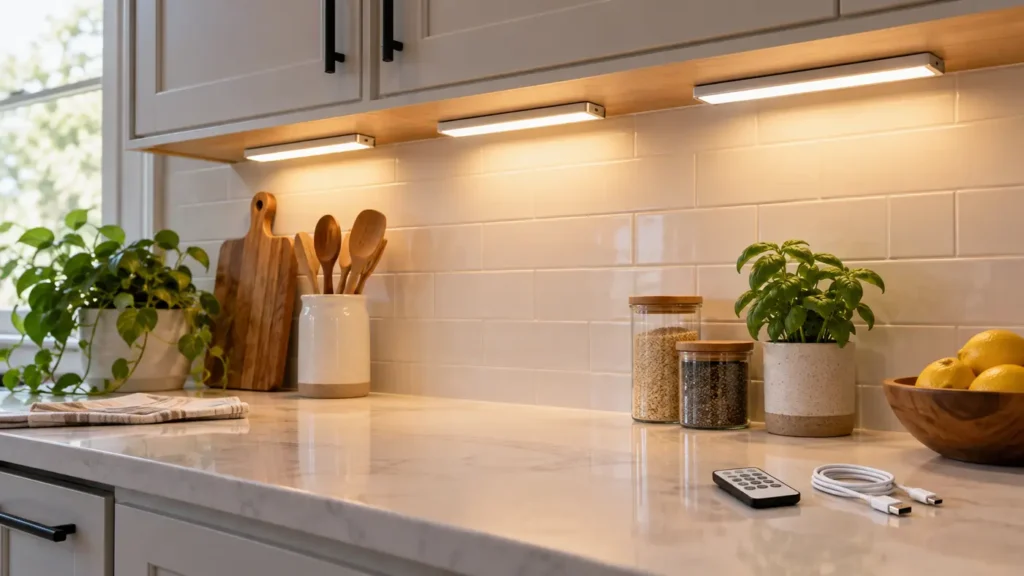
Adhesive under-cabinet lights illuminating a clean kitchen counter
DIY & Decorating

Best Under-Cabinet Lighting for Renters

Disclosure: This post contains affiliate links. If you buy through one of our links, we may earn a commission at no extra cost to you. Follow electrical and mounting instructions, keep lights away from heat and water, and test adhesive in a hidden area before installation.

Under-cabinet lighting can make a rental kitchen easier to use without opening walls or changing fixtures. Rechargeable bars, plug-in strips and puck lights each solve a different problem, but adhesive quality and removal matter as much as brightness.

A good renter setup illuminates the work surface evenly, hides the light source from normal view and can be removed without damaging the cabinet finish.

Quick verdict

Choose slim rechargeable or plug-in light bars with magnetic mounts, adjustable brightness, warm-to-neutral colour and a manual override for the motion sensor. Magnetic adhesive plates let you remove the light for charging while leaving a low-profile mount in place.

Renter-friendly lighting types

Choice Best for Advantage Watch for
Rechargeable bar No nearby outlet Clean installation and easy removal Needs regular charging
Plug-in LED strip Long counters and daily use Continuous power and even light Visible cord routing
Puck lights Small zones and display shelves Flexible placement Can create bright spots and shadows
Battery bars Occasional use Simple and inexpensive Battery waste and lower output

Measure the work area

Measure cabinet length, depth and the distance to outlets. One long bar often gives more even light than several pucks. Mount toward the front edge so light reaches the counter instead of washing only the backsplash.

Brightness and dimming

Look for stated lumen output rather than vague terms such as super bright. Dimming helps switch between food preparation and evening ambience. More brightness is not useful when glare reflects from polished counters.

Colour temperature and quality

Warm light feels cosy; neutral white is often better for food preparation. Adjustable colour temperature offers flexibility. A higher colour-rendering rating helps food and surfaces look more natural.

Motion sensors

Motion activation is handy for late-night use but can be irritating during cooking if the light times out. Choose a model with always-on, off and sensor modes. Check whether the sensor can see movement from the counter position.

Mounting without damage

Clean the surface as directed and test adhesive on a hidden area. Painted, waxed or delicate finishes may lift. Magnetic plates simplify charging, while removable strips can reduce damage when used correctly.

Charging and cords

For rechargeable bars, check runtime at the brightness you will use and whether they operate while charging. For plug-in lights, route low-voltage cords neatly without pinching them in doors or placing them near heat.

Installation plan

  1. Test the light temporarily with painter’s tape.
  2. Check glare while standing and sitting.
  3. Confirm sensor coverage and cabinet-door clearance.
  4. Clean and dry the approved mounting spot.
  5. Apply the mount and observe the specified cure time.
  6. Save spare adhesive for moving day.

Common buying mistakes

  • Mounting at the back edge where light misses the counter
  • Buying pucks that create harsh spots
  • Ignoring charging frequency
  • Choosing a sensor with no manual-on mode
  • Applying adhesive to a fragile finish without testing
  • Routing cords near a toaster, range or sink

Frequently asked questions

Are rechargeable lights bright enough?

Many are suitable for task lighting on a short counter, but compare lumens and expect shorter runtime at full brightness.

Where should the bar be mounted?

Usually near the front underside of the cabinet, hidden from view but aimed across the work surface.

Will adhesive damage cabinets?

It can. Test first, follow removal directions and avoid fragile, peeling or uncured finishes.

Do motion sensors work during the day?

Some have ambient-light sensors and stay off in bright rooms. Check whether that behaviour is adjustable.

Are plug-in lights renter-friendly?

Yes when cords can be routed safely and mounts removed cleanly. They avoid charging and suit daily use.

Shop renter-friendly under-cabinet lights

Compare mounting strips, lumen output, colour temperature, charging, sensor behaviour, controls and replacement adhesive.

Shop Amazon USA Shop Amazon Canada

Who should buy it—and who should skip it

Buy it if: your kitchen needs more task light and you want a renter-friendly setup that can be removed later.

Skip it if: the mounting surface cannot safely take adhesive, the light would sit close to heat or water, or you need permanent hardwired lighting.

Best value

Rechargeable magnetic light bars are the best value when outlets are inconvenient and the lights run for short periods. A plug-in strip is the better value for long daily use when an outlet is nearby.

When the upgrade is worth it

Pay more for smoother dimming, better colour consistency, replaceable mounting hardware, and reliable motion controls. Do not pay extra for app features if simple manual controls fit the job.

Final answer

For most renters, magnetic rechargeable light bars offer the cleanest balance of easy installation and removal. Choose manual control alongside the sensor, mount near the cabinet’s front edge and keep brightness adjustable. A plug-in strip is better when an outlet is close and the lights run for hours every day.

Improve the rest of the room with our small-kitchen habits guide and relaxing lighting ideas.

Scroll to Top